
Artificial Intelligence (AI) is becoming an integral part of everyday life. Across grades K–12, Bethlehem is committed to helping students understand and use AI in ways that are safe, ethical, and effective, as part of our broader focus on digital literacy and innovation.
Students have access to district-approved AI tools, including MagicSchool and Google NotebookLM, which are designed to support learning while upholding student privacy and academic integrity.
Our Approach
We use a human-centered model: AI can support learning and efficiency, but people remain responsible for judgment, accuracy, fairness, and final decisions.
- Human Oversight: AI output must be reviewed by a person for accuracy, fairness, and context.
- Privacy & Safety: Don’t input student PII (personally identifying information) or confidential data into unapproved tools.
- Transparency: We communicate when AI tools are used in district interactions.
- Academic Integrity: Expectations are clear – students remain responsible for what they submit.
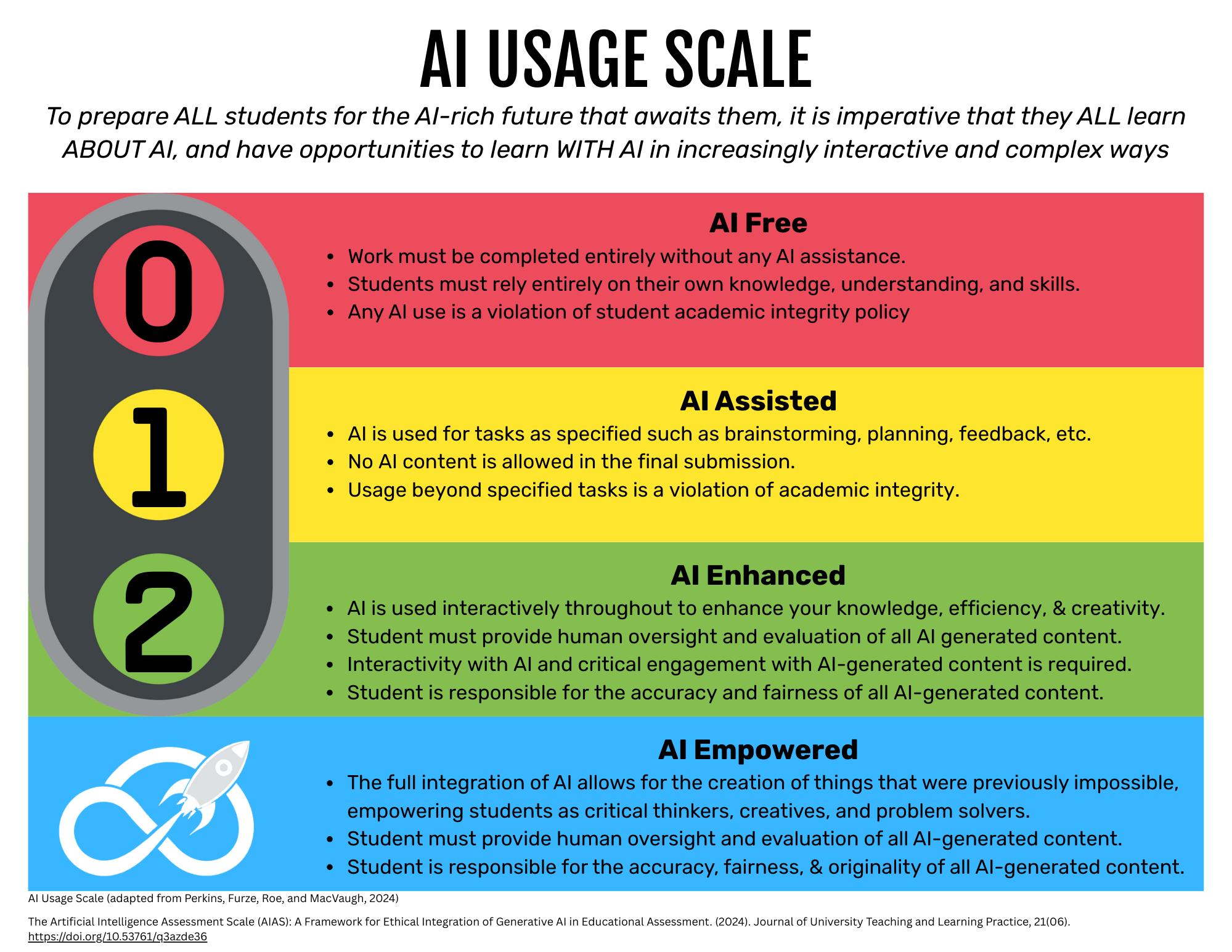
AI Usage Scale
The goal isn’t “AI or no AI.” The goal is matching AI use to the learning outcome while keeping students responsible for reasoning, judgment, and accuracy.
- Level 0 — AI Free: Work completed without AI assistance (often best in-class/supervised).
- Level 1 — AI Assisted: AI may help with brainstorming/planning/feedback, but AI-generated content should not appear in the final submission.
- Level 2 — AI Enhanced: AI can improve clarity/efficiency, but students must evaluate, verify, and take responsibility for their final work.
- Level 3 — AI Empowered: Full integration for creating things that are otherwise not possible. Students still own accuracy, fairness, and originality.
Teachers will name the expected level on major assignments to reduce ambiguity.
Resources
Teachers
Classroom Guidance
- State the expected AI Usage Scale on major assignments (what’s allowed, what’s not).
- Require “visible thinking” when AI is involved: evaluation, justification, and revision.
- Use only district-vetted, age-appropriate tools; review AI outputs before use.
Downloads
- District Guidelines [PDF]
- Usage Scale Detail [PDF]
If you are unable to access the PDFs above, please contact the BC Communications Office at 518-439-3650.
Students
Using AI responsibly
- Use AI as a helper, not a replacement for learning.
- Check for mistakes, bias, and missing context.
- You are responsible for anything you submit.
- Follow your teacher’s expectations for the AI Usage Scale level and disclosure.
Helpful links
- MagicSchool AI
- Notebook LM (Google)
Families
What families should know
- Students may use district-approved tools to support learning while protecting privacy.
- AI can be helpful for practice, feedback, organization, and accessibility support.
- Encourage your child ot explain their thinking and verify AI outputs.
- If you have questions about AI tools and instructional usage, contact Dr. David F. Hurst, Deputy Superintendent, dhurst@bethlehemschools.org.